A handheld controller for a telescope
Designed for the Express Scientific PMC-8 mount
by Honey Software LLC
by Honey Software LLC
Beta Version 1.0
There are a lot of handheld controllers for mounts that have various functionalities,
for example a goto control or a autoguider, this one was developed around both those.
It was developed mostly just to learn more about the mount and the ASCOM drivers.
I'm new to controlling mounts and the applications to control them,
and this creating a handheld controller seems like a good way to learn.
A short video
The Ascom Client
Features
The code for the display is written in C++ using Visual Studio Code and Platform IO.
It's all written from scratch. There was some starting code borrowed from the
lvgl library for the widgets which helped a great deal.
The controller talks to the ASCOM client via Bluetooth.
Bluetooth has the advantage in that no internet is required so there
is no need to add the AP host and password.
It does require pairing to the pc and discovering the com port assigned, but that is standard.
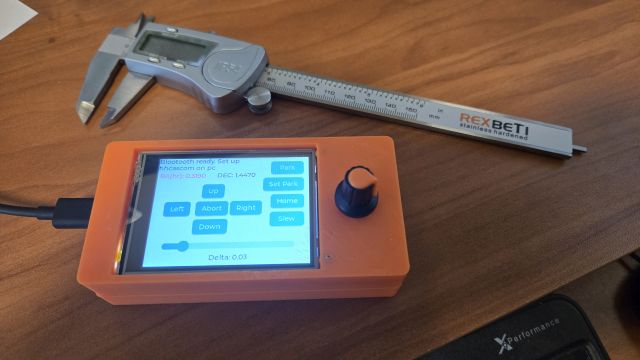
The handheld controller does give a status of the connection in the upper left of the screen.
Some of the handheld features:
Moving the mount left, right, up, and down.
The slider on the bottom sets the speed or delta of how much to move
Park function. The park button turns red when the mount is parked,
Set Park,
Home,
Slew to coordinates after setting
Position of the mount RA and DEC. The RA is shown in fractions of an hr, The DEC is shown in fractions
of degrees
The knob control is an encoder that allows to set the desired RA. To keep the interface simple, the knob
is clicked and to set the DEC. Which is selected is highlighted in red.
The handheld was built around an ESP32, the similar controller that is in the PMC-8.
It contain a CYD (cheap yellow display) with a resistive touch panel, purchased on Amazon but available
many places elsewhere. The CYD contains the ESP32. There is also an encoder to see the right ascension
(RA) and declination (DEC) position of the mount, shown on the right side. Size is about 4.5" x 2.2" x 1"
and contains a battery. The case was custom designed on Fusion 360 and printed on a 3D printer in PLA.
The code for the display is written in C++ using Visual Studio Code and Platform IO. It's all written from
scratch. There was some starting code borrowed from the lvgl library for the widgets which helped a great
deal.
The controller talks to the ASCOM client via Bluetooth. Bluetooth has the advantage in that no internet is
required so there is no need to add the AP host and password. It does require pairing to the pc and
discovering the com port assigned, but that is standard. The handheld controller does give a status of
the connection in the upper left of the screen.
The ASCOM client development was a lot easier that I originally thought it would be.
I borrowed the starting of the code from the ASCOM client
example program on the ASCOM website. It was written in CSharp with Visual Studio 2002
Since this is the first CSharp program I have written there was a learning curve.
However, after getting the idea how VS works in
CSharp there was a lot of leverage from C++ foundation class, which is old hat to me.
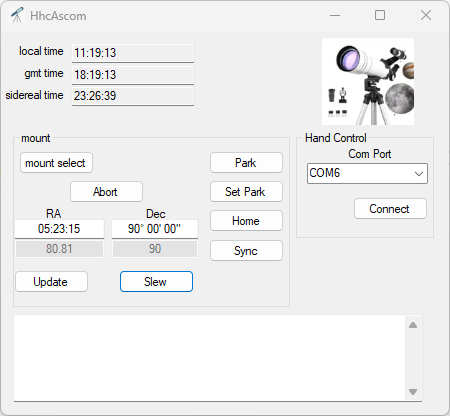
This interface echos the controller in many ways and can be used as a stand alone
controller for the mount. It's hard to understand why anyone would want to do that
since any of the good star maps do that same thing, but it was necessary to add the
feature in to accept commands from the handheld. The client is written for .Net since
that is the example I found. Alpaca example client programs were hard to find.
The mount select button brings up the standard ASCOM selection.
The Com Port selection is the serial port that Windows selected for the Bluetooth
our serial connection.
Although this client was only tried with the PMC-8 mount it should work for any mount,
theoretically, since it is purely ASCOM compliant. But I haven't tried it on any other mount.
Known Bugs
Despite our best intentions, there are always bugs. Here are the know ones.